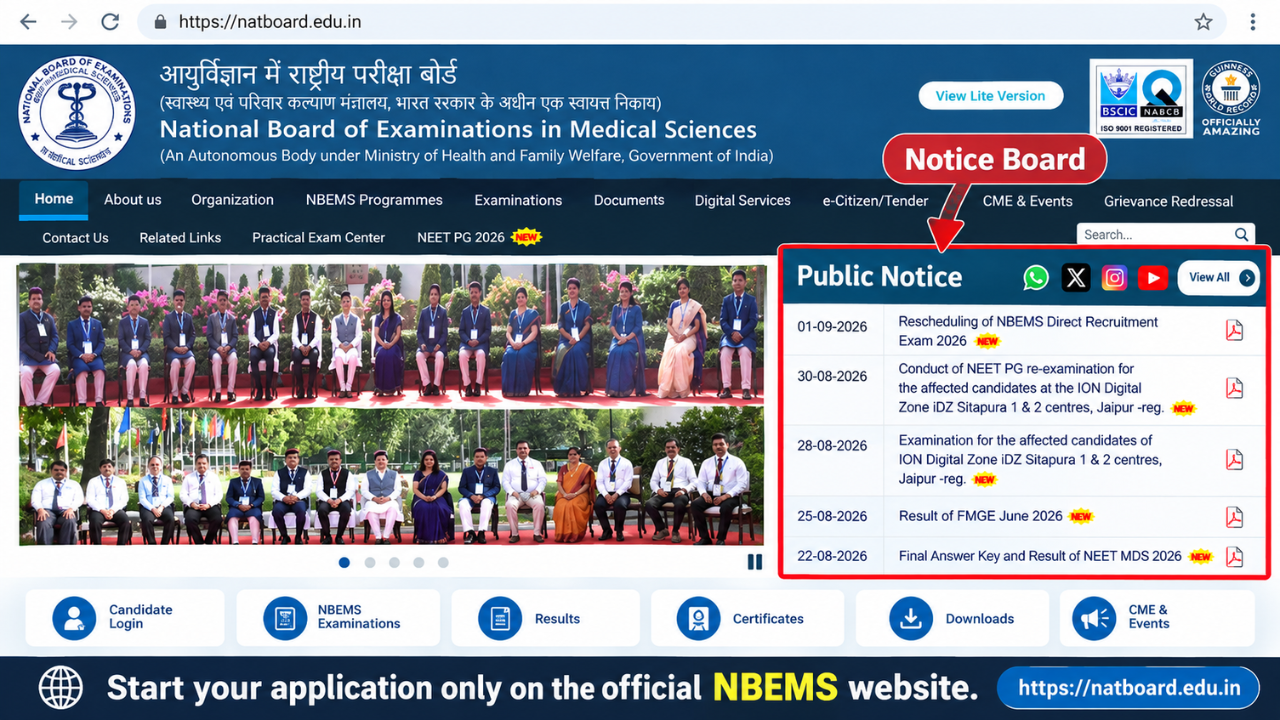
नेशनल बोर्ड ऑफ एग्जामिनेशंस इन मेडिकल साइंसेज (NBEMS) की ग्रुप A, B और C भर्ती की कंप्यूटर आधारित परीक्षा (CBT) के लिए एडमिट कार्ड का इंतजार कर रहे अभ्यर्थियों के लिए यह गाइड है। इसमें हॉल टिकट डाउनलोड करने की प्रक्रिया, परीक्षा केंद्र पर ले जाने वाले दस्तावेज, संभावित परीक्षा पैटर्न और सामान्य तकनीकी समस्याओं के समाधान आसान हिंदी में दिए गए हैं।
स्थिति संबंधी सूचना: उपलब्ध मूल सामग्री में एडमिट कार्ड जारी होने की निश्चित तारीख या CBT की निश्चित परीक्षा तारीख नहीं दी गई है। इसलिए हॉल टिकट जारी हो चुका है, ऐसा मानकर न चलें। नवीनतम सूचना और पदवार नियम आधिकारिक NBEMS वेबसाइट से जांचें। नीचे दिया परीक्षा पैटर्न भी मूल सामग्री पर आधारित है; संबंधित आधिकारिक विज्ञापन से पुष्टि करें।
NBEMS भर्ती 2026 में कौन-कौन से पद हैं?
NBEMS प्रशासनिक और तकनीकी श्रेणियों में सीधी भर्ती करता है। इस लेख में जिन पदों का उल्लेख है, वे हैं:
- डिप्टी डायरेक्टर (मेडिकल) — ग्रुप A
- जूनियर प्रोग्रामर — ग्रुप B
- जूनियर अकाउंटेंट — ग्रुप C
- स्टेनोग्राफर — ग्रुप C
- जूनियर असिस्टेंट — ग्रुप C
मूल लेख के अनुसार चयन प्रक्रिया में पहले CBT, उसके बाद पद के अनुसार कौशल या कंप्यूटर दक्षता परीक्षा तथा दस्तावेज सत्यापन शामिल हो सकते हैं। सटीक चरण संबंधित भर्ती विज्ञापन में देखें।

सिटी इंटिमेशन स्लिप और एडमिट कार्ड में क्या अंतर है?
सिटी इंटिमेशन स्लिप का उद्देश्य आमतौर पर परीक्षा के लिए आवंटित शहर की जानकारी देना होता है, ताकि अभ्यर्थी यात्रा की तैयारी कर सकें। इसे परीक्षा केंद्र में प्रवेश के लिए एडमिट कार्ड का विकल्प नहीं समझना चाहिए।
हॉल टिकट या एडमिट कार्ड में सामान्यतः रोल नंबर, परीक्षा केंद्र का पूरा पता, परीक्षा तिथि, शिफ्ट, रिपोर्टिंग और गेट बंद होने का समय तथा आवश्यक निर्देश दर्ज होते हैं। प्रवेश के लिए आधिकारिक एडमिट कार्ड और उसमें बताए गए पहचान दस्तावेज आवश्यक हैं।
NBEMS ग्रुप A, B और C एडमिट कार्ड 2026 कैसे डाउनलोड करें?
- natboard.edu.in खोलें। वैकल्पिक आधिकारिक वेबसाइट nbe.edu.in भी देखें।
- वेबसाइट पर Notice Board या Vacancies/Recruitment सेक्शन खोलें।
- संबंधित ग्रुप A, B और C भर्ती के Admit Card / Hall Ticket लिंक को चुनें, यदि उपलब्ध हो।
- आधिकारिक लॉगिन पेज पर आवेदन संख्या/यूजर आईडी तथा मांगा गया पासवर्ड, जन्मतिथि या कैप्चा दर्ज करें।
- डैशबोर्ड में एडमिट कार्ड का विकल्प खोलकर PDF डाउनलोड करें।
- PDF को सुरक्षित रखें और स्पष्ट A4 प्रिंट निकालें। फोटो और बारकोड/QR कोड साफ दिखाई देने चाहिए।
लॉगिन का तरीका और आवश्यक विवरण भर्ती पोर्टल के अनुसार बदल सकते हैं। किसी अनजान वेबसाइट पर अपने लॉगिन विवरण दर्ज न करें।

हॉल टिकट डाउनलोड होने के बाद क्या जांचें?
- अभ्यर्थी का पूरा नाम, माता-पिता का नाम, जन्मतिथि और श्रेणी
- आवेदन संख्या, रोल नंबर और आवेदन किया गया पद
- फोटो और हस्ताक्षर की स्पष्टता
- परीक्षा तारीख, शिफ्ट, रिपोर्टिंग समय और गेट बंद होने का समय
- परीक्षा केंद्र का पूरा पता और बताए गए पहचान-पत्र संबंधी नियम
- बारकोड या QR कोड, यदि हॉल टिकट पर दिया गया हो
किसी जानकारी में त्रुटि मिले तो आवेदन की प्रति और पहचान प्रमाण के साथ आधिकारिक सहायता चैनल से संपर्क करें। मूल लेख में recruitment@natboard.edu.in और 011-45593000 का उल्लेख है; इस्तेमाल करने से पहले इन्हें वर्तमान आधिकारिक भर्ती सूचना में सत्यापित करें।
NBEMS CBT परीक्षा पैटर्न 2026
मूल लेख में स्टेज-I के लिए 200 वस्तुनिष्ठ प्रश्न, कुल 200 अंक और तीन घंटे का समय बताया गया है। इसे सभी पदों पर लागू आधिकारिक पैटर्न न मानें; पदवार विज्ञापन और एडमिट कार्ड के निर्देश अंतिम होंगे।
| विषय | प्रश्न | अंक |
|---|---|---|
| सामान्य जागरूकता | 50 | 50 |
| तार्किक क्षमता एवं मानसिक योग्यता | 50 | 50 |
| अंग्रेजी भाषा | 50 | 50 |
| मात्रात्मक अभिरुचि | 50 | 50 |
| कुल | 200 | 200 |
मूल लेख में प्रत्येक गलत उत्तर पर 0.25 अंक काटे जाने और बिना प्रयास वाले प्रश्नों पर कटौती न होने की बात कही गई है। इसे आधिकारिक सूचना से अवश्य मिलाएं। स्टेज-II में पद के अनुसार टाइपिंग, शॉर्टहैंड या तकनीकी दक्षता परीक्षा हो सकती है।
परीक्षा के दिन कौन से दस्तावेज ले जाएं?
- स्पष्ट प्रिंट किया हुआ एडमिट कार्ड; एक अतिरिक्त प्रति रखना उपयोगी हो सकता है
- हॉल टिकट के निर्देशों के अनुसार मूल फोटो पहचान-पत्र, जैसे आधार, मतदाता पहचान-पत्र, पासपोर्ट, ड्राइविंग लाइसेंस या पैन कार्ड
- यदि निर्देशों में मांगा गया हो तो हाल की पासपोर्ट आकार की तस्वीरें
- PwBD या स्क्राइब संबंधी दस्तावेज, यदि लागू हों
- केवल अनुमति होने पर पारदर्शी बॉलपॉइंट पेन
मोबाइल फोन, स्मार्टवॉच, ब्लूटूथ उपकरण, कैलकुलेटर, नोट्स और अन्य प्रतिबंधित वस्तुएं परीक्षा केंद्र में न ले जाएं। अंतिम अनुमत और प्रतिबंधित वस्तुओं की सूची एडमिट कार्ड पर दी जाएगी। रिपोर्टिंग समय से पहले पहुंचें।

एडमिट कार्ड डाउनलोड नहीं हो रहा? ये उपाय आजमाएं
1. Invalid Credentials का संदेश
आवेदन संख्या, पासवर्ड और जन्मतिथि का प्रारूप दोबारा जांचें। Caps Lock बंद रखें और पोर्टल में उपलब्ध हो तो Forgot Password विकल्प का उपयोग करें।
2. वेबसाइट बार-बार लोड हो रही है
कुछ देर बाद दोबारा प्रयास करें। दूसरा ब्राउज़र, स्थिर इंटरनेट या निजी/इन्कॉग्निटो विंडो आजमा सकते हैं।
3. PDF खाली दिख रही है या फोटो गायब है
PDF डाउनलोड करके विश्वसनीय PDF रीडर में खोलें। ब्राउज़र का पॉप-अप अवरोधक जांचें और जरूरत पड़ने पर दोबारा डाउनलोड करें।
4. हॉल टिकट लिंक नहीं दिख रहा
हो सकता है संबंधित पद का एडमिट कार्ड अभी जारी न हुआ हो। केवल आधिकारिक नोटिस बोर्ड और भर्ती पेज पर दी गई सूचना का पालन करें।
अक्सर पूछे जाने वाले प्रश्न (FAQ)
क्या सिटी इंटिमेशन स्लिप से परीक्षा केंद्र में प्रवेश मिलेगा?
नहीं। परीक्षा में प्रवेश के लिए आधिकारिक हॉल टिकट और निर्देशानुसार पहचान-पत्र आवश्यक होते हैं।
NBEMS एडमिट कार्ड 2026 कब जारी होगा?
दिए गए स्रोत में निश्चित जारी होने की तारीख नहीं बताई गई है। नवीनतम घोषणा आधिकारिक वेबसाइट पर देखें।
क्या सभी पदों के लिए एक ही CBT पैटर्न होगा?
यह सुनिश्चित नहीं है। ऊपर दी गई तालिका मूल लेख का विवरण है। पदवार आधिकारिक विज्ञापन को प्राथमिकता दें।
क्या CBT के बाद स्किल टेस्ट होगा?
कुछ पदों के लिए टाइपिंग, शॉर्टहैंड या तकनीकी कौशल परीक्षा हो सकती है। सटीक चयन चरण संबंधित भर्ती नियमों पर निर्भर हैं।
आधिकारिक लिंक और अंतिम सलाह
आधिकारिक वेबसाइट: natboard.edu.in | nbe.edu.in
परीक्षा से पहले हॉल टिकट के सभी विवरण जांचें, जरूरी दस्तावेज तैयार रखें और केंद्र पर समय से पहुंचें। एडमिट कार्ड जारी होने की तारीख, परीक्षा कार्यक्रम, अंकन योजना और संपर्क विवरण के लिए केवल नवीनतम आधिकारिक नोटिस पर भरोसा करें।
Related posts:
 UP Cooperative Bank (UPCISB) Admit Card 2026: परीक्षा तारीख, शिफ्ट टाइमिंग और हॉल टिकट डाउनलोड करने की पूरी जानकारी
 एसएससी सिलेक्शन पोस्ट फेज 14 परीक्षा शहर सूचना 2026 जारी: परीक्षा तिथि, प्रवेश पत्र और डाउनलोड प्रक्रिया
 पटना उच्च न्यायालय सहायक प्रवेश पत्र 2026: प्रारंभिक परीक्षा की तारीख, डाउनलोड प्रक्रिया और जरूरी निर्देश
 आरपीएससी निरीक्षक प्रवेश पत्र 2026: परीक्षा तिथि, परीक्षा जिला और प्रवेश पत्र डाउनलोड करने की जानकारी
5 thoughts on “NBEMS Group A, B और C एडमिट कार्ड 2026: हॉल टिकट कैसे डाउनलोड करें, CBT पैटर्न और परीक्षा दिवस के निर्देश”